- PoolParty Semantic Suite Documentation
- PoolParty GraphSearch
- GraphSearch on RDF Dataset
GraphSearch on RDF Dataset
03/02/2026
An RDF dataset consists of a collection of RDF resources with internal and external references to form a whole. A search facet is a set of rules and conditions partitioning data into multiple dimensions and later allowing faceted search users to narrow the navigation down to a specific fragment. Faceting on RDF data can be simply implemented to categorize RDF resources by predicate and object values. In GraphSearch, a facet on RDF data can be created with three flavors by classes, relation and attribute.
Faceting by Classes
A resource can be an instance of a single or multiple classes. Faceting by classes will simply categorize resource by classes.
For example, given the following RDF data represented in Turtle:
urn:person1 a <http://schema.org/Person> . urn:org1 a <http://schema.org/Organization> .
You can build a facet with two facet members represented by classes <http://schema.org/Person> and <http://schema.org/Organization>. Then only resource <urn:person1> will be presented to the user if facet member <http://schema.org/Person> is selected.
Faceting by Relation
A resource can link to another resource via a relation. Faceting by a relation will apply to resources containing the relation and categorize selected resources by their object resources.
Given the following RDF data represented in Turtle
urn:person1 <http://schema.org/memberOf> urn:org1 . urn:person2 <http://schema.org/memberOf> urn:org2 .
You can build a facet with two facet members represented by resources urn:org1 and urn:org2. Then only resource <urn:person1> will be presented to the user if facet member urn:org1 is selected.
Faceting by Attribute
A resource can have attribute values. Faceting by attribute will apply to resources containing the attribute and categorize selected resources by their values. Values can be textual, numeric, temporal or boolean.
Given the following RDF data represented in Turtle:
urn:person1 <http://schema.org/sex> "Male" . urn:person2 <http://schema.org/sex> "Female" .
You can build a facet with two facet members represented by values "Male" and "Female". Then only resource <urn:person1> will be presented to the user if facet member "Male" is selected.
In general, an RDF dataset consists of multiple classes, relations and attributes. You have to define facets from them by creating custom schemes in PoolParty. You can model an ontology of the RDF dataset by creating classes, relations and attributes, which will automatically become facets in GraphSearch. All classes will create one facet. Each relation or attribute will create one facet. Note that only classes, relations and attributes that are used as facets should be defined in the custom ontology. After creating the custom ontology, you should create a custom scheme from the ontology.
After navigating to the GraphSearch Admin Dashboard, you can verify the connection to the remote database. If the connection is successful, the database will be marked as UP.
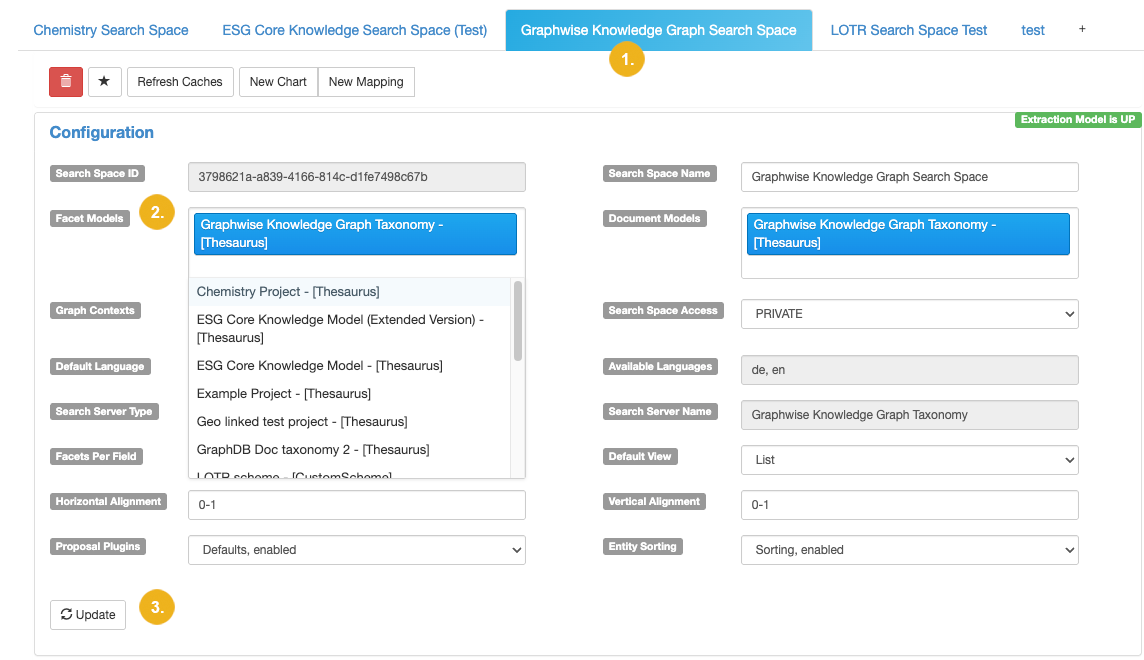
If the connection is active (indicated by green UP icon), navigate to the search space to view the configuration options. To configure facets, click Facet Models.. This opens the pulldown (2) listing all thesauri and custom schemes available for the selected search space (1). Select the facet models you want to use for the facet definition. Confirm your selection with a click on Update (3).
By default, search result of RDF resources are presented as documents in a list, with title and description fields providing some information about resources. In the Mappings section, you can specify the predicate URIs of resources representing the attribute values which can be used for titles and descriptions as well as facets, images and full text search.
If you want to use <http://schema.org/name> as title and <http://schema.org/description> as description, those two predicate URIs have to be added into the corresponding fields of the mapping list. For each field, multiple predicates can be provided as an ordered list and the first valid value will be used.
For example, given the following RDF data represented in Turtle
urn:org1 a <http://schema.org/Organization> . urn:org1 <http://schema.org/name> "Graphwise" . urn:org1 <http://schema.org/description> "Graphwise is the leading provider of graph-based metadata, search, and analytic solutions." .
Given the description field in the image below, for example, the object value of skos:definition will be displayed as description in the search result. If it does not exist, then rdfs:comment will be used. When no object of any predicate exists in the dataset, the field will be empty.
Important
At least one predicate URI has to be specified for Description Mappings and Title Mappings.
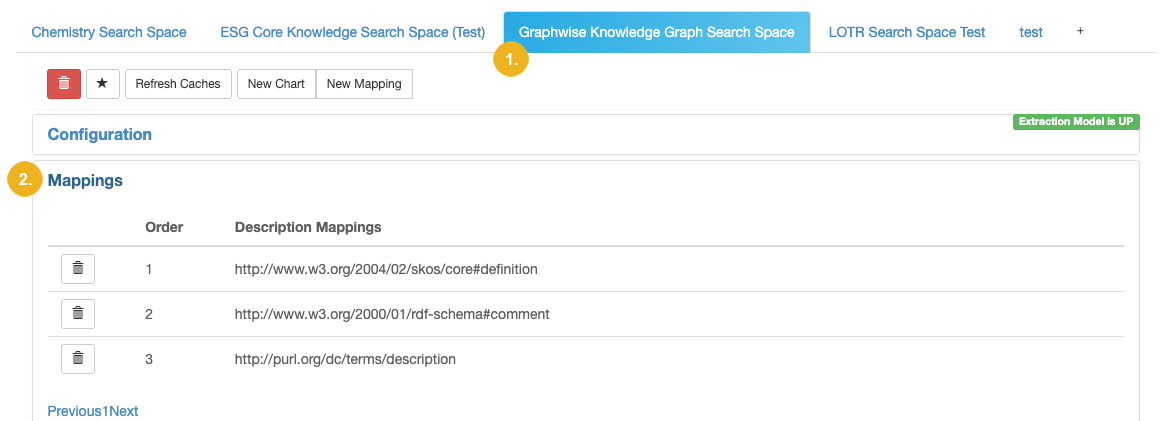
The image above shows the Description Mappings (2) defined for the selected search space (1).
When a facet from a relation exists, it is also possible to specify a predicate URI of which a value can be used to represent the object resource in a more human readable way. Otherwise, facet members in the facet list will be displayed as URIs of object resource. This configuration is also integrated with the predicate configuration of the title field. So the predicates listed in title field actually defines two views at the same time.
Given the following RDF data represented in Turtle:
urn:person1 <http://schema.org/memberOf> urn:org1 . urn:org1 <http://schema.org/name> "Graphwise" .
If the relation <http://schema.org/memberOf> is a facet then urn:org1 will be displayed as a facet member by default. If, however, <http://schema.org/name> is added as a qualified predicate for title field, then the value "Graphwise" will be displayed instead of URI urn:org1, which can improve usability of the application.
